




여권사진편집 쉽게 하는 법|규격 맞추기부터 보정까지 완벽 가이드

급하게 여권을 사용해야 하는데 여권 사진이 만료되어 곤란했던 경험이 있으신가요? 게다가 여권 사진 편집이나 재촬영을 위해 사진관에 방문할 시간조차 없었다면 더욱 난감하셨을 겁니다. 다행히 최근에는 여권 사진 편집이 가능한 앱이 등장하면서 언제 어디서나 여권 사진을 만들 수 있게 되었습니다. 그렇다면 여권 사진 편집은 어떻게 하면 될까요? 오늘 포스팅에서는 가장 추천할 만한 여권 사진 편집 앱과 여권 사진 편집을 간단하게 하는 방법을 단계별로 안내해 드립니다. 끝까지 읽으시고 직접 여권 사진 편집을 해보세요!

- iPhone과 Android에서 여권 사진 편집에 가장 적합한 무료 앱
- 디지털 여권 사진을 만드는 5단계 방법
- 사진 편집으로 여권 사진 완성도 높이기
- 여권 사진 규정 및 표준 사진 예시
- 여권 사진 편집에 최적인 무료 앱 다운로드
iPhone과 Android에서 여권 사진 편집에 가장 적합한 무료 앱
포토디렉터는 iOS와 Android에서 모두 사용할 수 있는 사진 편집 앱으로, 여권 사진 편집을 포함해 다양한 사진 보정 기능을 제공합니다. 특히 여권 사진 편집에 최적화된 ID 사진 기능을 제공해 규정에 맞는 여권 사진을 쉽고 빠르게 만들 수 있습니다. 다음은 포토디렉터의 여권 사진 편집(ID 사진) 기능 주요 특징입니다.
- 사용자 친화적인 UI:
- 인물 보정 도구 제공:
- 사이즈 조정 기능:
포토디렉터는 직관적이고 사용하기 쉬운 인터페이스를 제공해, 누구나 여권 사진 편집 기능을 손쉽게 사용할 수 있습니다.
포토디렉터에는 여권 사진 편집에 활용할 수 있는 다양한 인물 보정 도구가 포함되어 있습니다. 피부 보정, 잡티 제거, 다크서클 완화, 치아 미백 등 세밀한 보정이 가능해 여권 사진을 보다 깔끔하고 전문적으로 완성할 수 있습니다.
사이즈 조정 기능을 활용하면 여권 사진 편집 과정에서 신분증이나 여권 사진에 필요한 규격에 맞게 사진 크기를 손쉽게 변경할 수 있습니다. 이를 통해 각종 신분증과 여권 사진 편집 시 요구되는 규정 사이즈를 정확히 충족할 수 있습니다.
디지털 여권 사진을 만드는 5단계 방법
- 포토디렉터 다운로드: 최고의 무료 여권 사진 편집 앱
포토디렉터는 직관적인 UI와 다양한 기능을 제공해 여권 사진 편집은 물론 사진 보정과 크기 조정까지 쉽게 할 수 있습니다. App Store 또는 Google Play Store에서 앱을 다운로드하고, 바로 여권 사진 편집을 시작해 보세요.
- [ID 사진]을 클릭하고 셀카 촬영하기
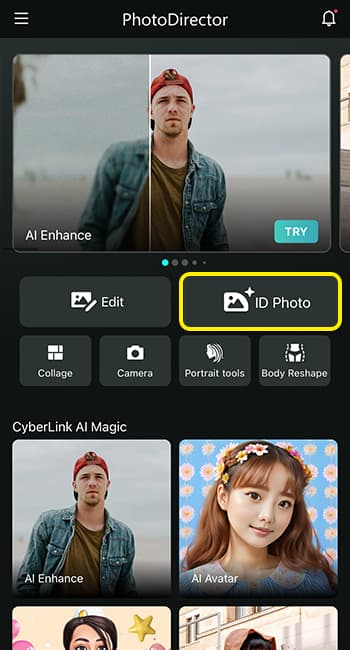
앱을 실행하면 [ID 사진] 섹션이 바로 보입니다. 해당 항목을 누르면 얼굴 윤곽이 표시된 카메라 화면이 나타납니다.
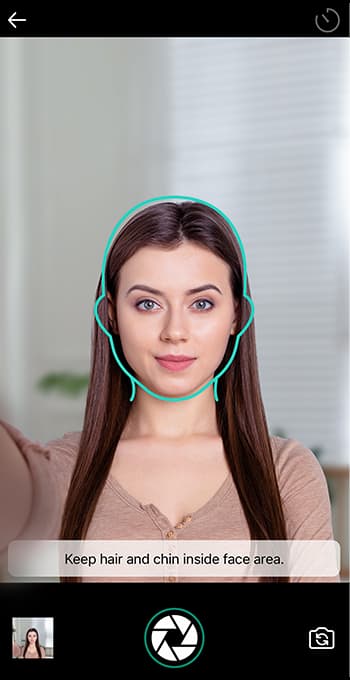
셀카를 촬영할 때 머리와 턱이 프레임 안에 잘 들어오도록 맞춰 주세요. 기존 사진으로 여권 사진 편집을 하고 싶다면, 왼쪽 하단의 박스를 눌러 사진을 불러올 수 있습니다.
- 인물 보정 도구로 사진 편집하기
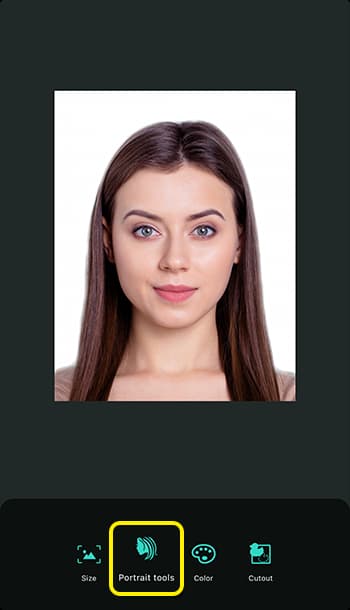
단 1초 만에 기본 여권 사진이 준비되면, 인물 보정 도구를 활용해 여권 사진 편집을 진행할 수 있습니다. 얼굴 슬림, 피부 보정, 잡티 자동 제거, 다크서클 커버, 치아 미백, 주름 제거 등 다양한 여권 사진 편집 기능이 포함되어 있습니다. 이러한 기능을 활용하면 사진관에서 촬영한 것처럼 완성도 높은 디지털 여권 사진 편집이 가능합니다.
- 사진 크기 조정하기
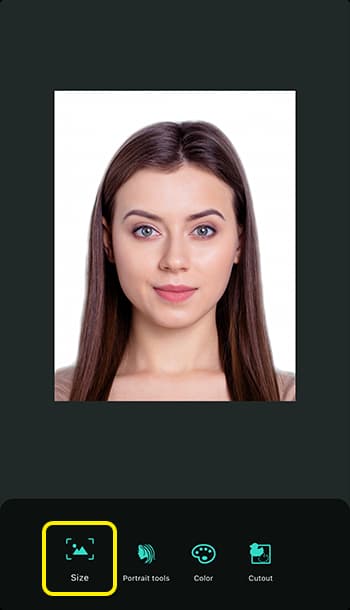
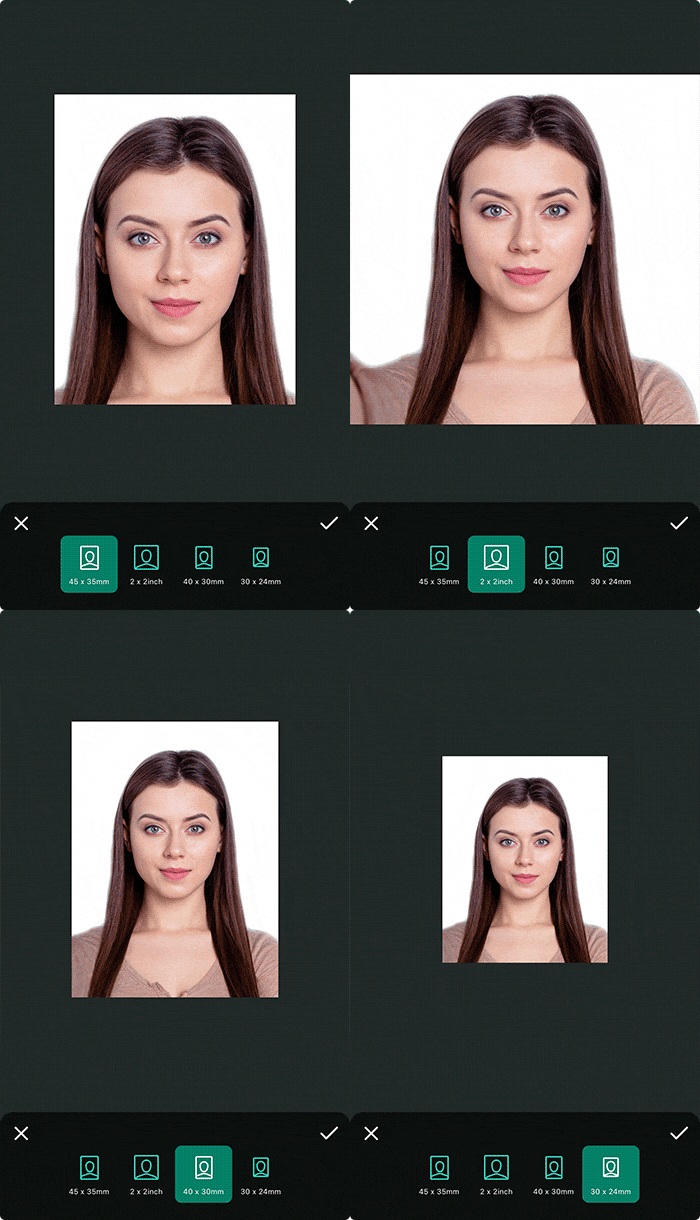
[크기 조정(Resize)]을 클릭해 국가별 여권 사진 규정에 맞게 사진 사이즈를 정확히 조절할 수 있습니다. 여기서 포토디렉터는 여권 사진 편집에 자주 사용되는 4가지 ID 사진 규격을 제공합니다.
- 45 x 35 mm: 해당 규격은 여권 사진 편집 시 가장 널리 사용되는 사이즈 중 하나입니다. 영국을 비롯해 다수의 UN 회원국, 일본, 중국, 호주 등 여러 국가에서 여권 사진 규격으로 인정되고 있습니다.
- 2 x 2인치: 2 x 2인치 ID 사진 사이즈는 주로 미국에서 사용됩니다. 여권, 운전면허증, 이민 서류 등 다양한 신분증 발급을 위한 여권 사진 규격으로 널리 활용됩니다.
- 40 x 30 mm: 40 x 30mm 규격은 유럽 국가에서 많이 사용되며, 유럽 비자 신청이나 일부 국가 신분증용 여권 사진에 적용됩니다.
- 30 x 24 mm: 싱가포르, 말레이시아, 태국 등은 주민등록증이나 운전면허증 등 공식 문서 발급 시 이 규격의 여권 사진을 요구하는 경우가 많습니다.
- 이제 완벽한 여권 사진이 완성되었습니다!
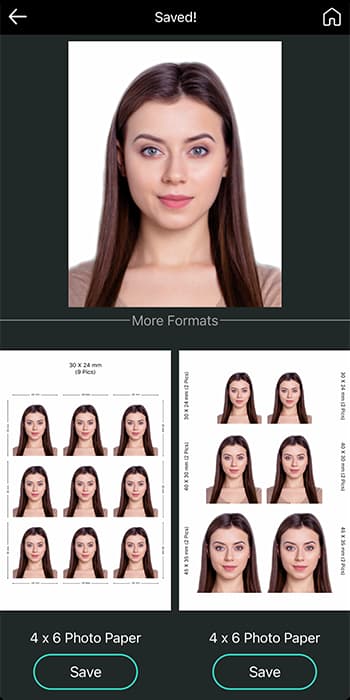
단 1분 만에 새로운 디지털 여권 사진 편집을 완료하셨습니다. 다운로드 버튼을 눌러 여권 신청 시 바로 제출하실 수 있습니다. 사진 저장 시 다양한 출력 형식을 선택해 다른 신분증 발급용 여권 사진 편집에도 활용할 수 있습니다.


여권 사진 규정 및 표준 사진 예시
- 표준 사진 예시
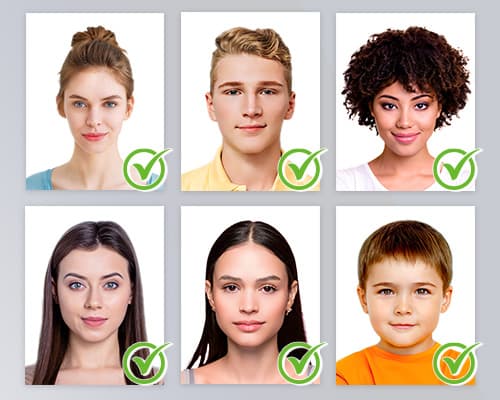
아래는 참고하실 수 있는 여권 사진 편집 표준 예시입니다. 여권 사진 편집 시 규정된 사이즈를 충족하고 선명도와 조명이 적절하며, 배경은 단색이고 얼굴 표정과 머리 위치 기준을 정확히 지켜주시면 됩니다.
- 여권 사진 사이즈 및 규격
35mm x 45mm는 여권 사진 편집에서 가장 일반적으로 사용되는 규격이지만, 국가별로 요구하는 사이즈는 서로 다를 수 있습니다. 예를 들어 미국은 2 x 2인치(51mm x 51mm), 캐나다는 50mm x 70mm 규격의 여권 사진 편집을 요구합니다. 따라서 여권 사진 편집 시 반드시 해당 국가의 규정을 정확히 확인하고 따라야 합니다.
또한 대부분의 경우 턱 아래부터 머리 윗부분(머리카락 제외)까지의 길이는 25~35mm 범위여야 합니다. 이러한 세부 기준 역시 국가마다 다를 수 있습니다.
- 얼굴 표정 및 복장 규정
대부분의 여권 사진 편집 규정은 입을 다문 중립적인 표정과, 양쪽 눈을 뜬 상태로 정면을 바라보는 모습을 요구합니다. 웃거나 찡그리는 등 과도한 표정은 여권 사진 반려 사유가 될 수 있습니다. 머리를 과하게 기울이거나 얼굴 일부를 가리는 경우에도 여권 사진이 거부될 수 있습니다.
- 이미지 품질 및 배경
여권 사진 편집 시 이미지 품질은 선명도, 초점, 균일한 조명, 적절한 배경을 모두 충족해야 합니다. 흐릿하거나 픽셀이 깨진 사진, 조명이 고르지 않거나 그림자·반사가 심한 사진은 품질 기준에 미달합니다. 이러한 문제는 얼굴 인식 정확도를 떨어뜨리고 색감을 왜곡해 여권 사진 편집 결과가 반려될 수 있습니다.

여권 사진 편집에 최적인 무료 앱 다운로드
다음에 급하게 디지털 여권 사진 편집이 필요할 때는 포토디렉터를 기억해 주세요. 포토디렉터는 사용하기 쉬운 인터페이스와 인물 보정 도구를 제공해 여권 사진 편집에 최적화되어 있습니다. AI 보정 기능을 활용하면 한 번의 클릭만으로도 또렷한 여권 사진 편집이 가능합니다. App Store와 Google Play Store에서 무료로 다운로드할 수 있는 이 유용한 여권 사진 편집 앱을 놓치지 마세요!
![[2026년 최신] 동영상 화질을 개선할 수 있는 프로그램 7가지 추천](https://dl-file.cyberlink.com/web/content/b3280/l_Thumbnail.webp)
![[2026년 최신] AI로 동영상을 제작할 수 있는 편집 프로그램 5가지 추천](https://dl-file.cyberlink.com/web/content/b3235/l_Thumbnail.webp)
![[2026년 최신] 인터넷 방송용 웹캠에 반드시 필요한 무료 웹캠 프로그램 5가지](https://dl-file.cyberlink.com/web/content/b1201/l_Thumbnail.webp)


